About Txpass

Stop pasting API keys into agents.

AI agents need to call paid APIs on your behalf. Today that usually means copying a long-lived API key into every agent, config file and teammate’s machine. Txpass gives each agent its own key and short sessions you approve once and can take back any time.

Today: one key, everywhere

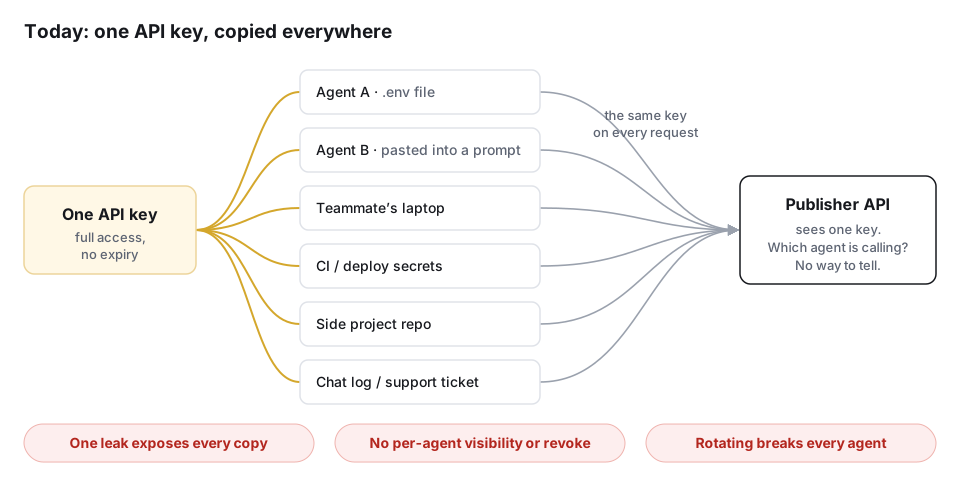
An API key is a password that never expires and can’t tell who is holding it. Once it’s shared with agents, it spreads: into .env files, prompts, CI secrets, side projects and chat logs.

Diagram: one API key is copied into two agents, a teammate's laptop, CI secrets, a side project and a chat log. Every copy sends the same key to the publisher API, which can't tell which agent is calling. One leak exposes every copy, there is no per-agent revoke, and rotating breaks every agent.
One shared key: any leak exposes all of it, nobody can tell which agent made a call, and rotating it breaks every agent at once.

With Txpass: sign once, one key per agent

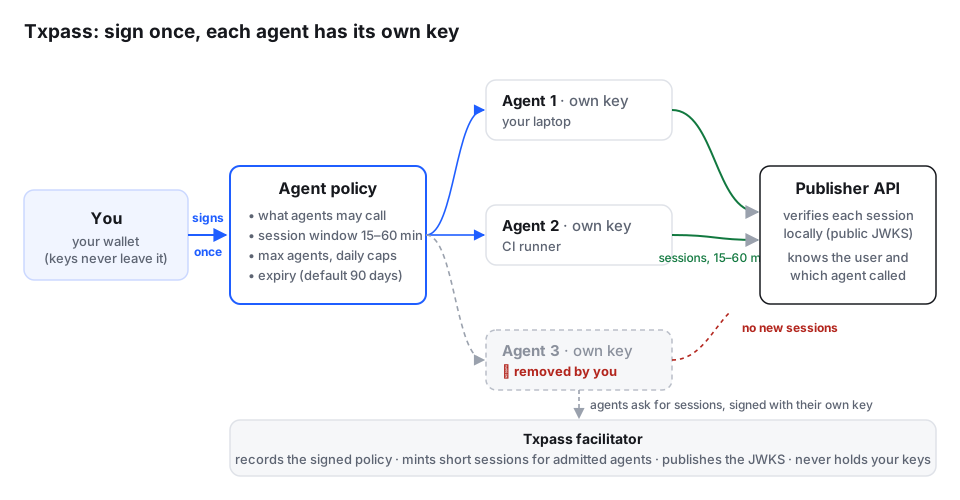
You sign an agent policy once with your passkey (or an optional wallet): what agents may call, how long each session lasts, how many agents and how many sessions a day. Each agent joins with its own key, created on its own machine, and uses it to mint short sessions. The API checks each session locally against a public key set. Remove one agent and the others keep working.

Diagram: you sign an agent policy once with your passkey. Agents 1 and 2 each have their own key and mint 15 to 60 minute sessions from the Txpass facilitator. The publisher API verifies each session locally with the public JWKS and knows which agent called. Agent 3 has been removed and gets no new sessions, while agents 1 and 2 keep working.
Your identity key signs the policy; agents never see it, and Txpass never holds it.

How an agent connects

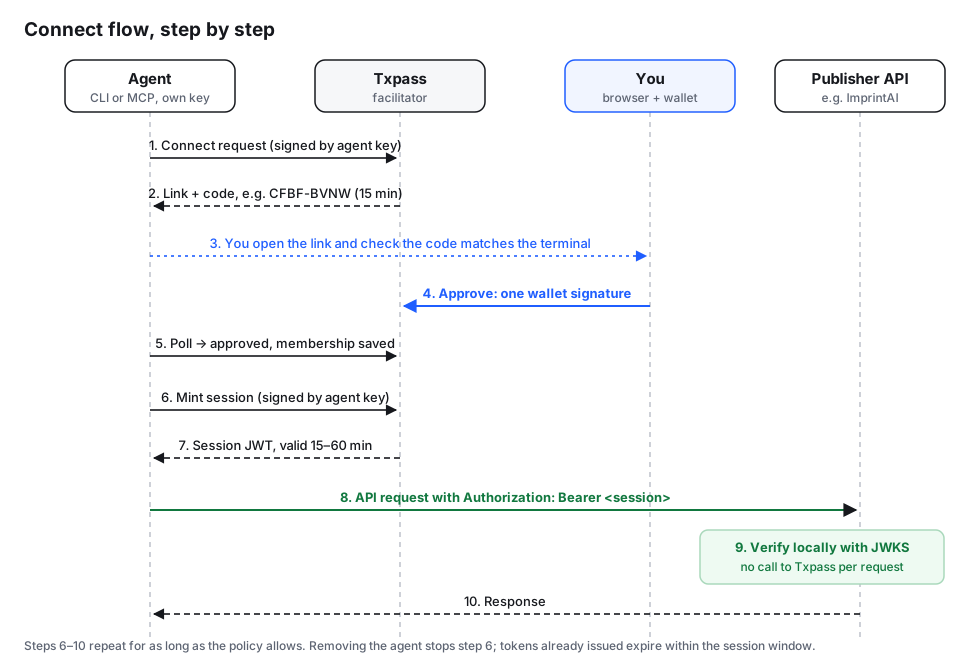
Connecting works like signing a TV into a streaming account: the agent starts it, you approve in the browser. The link on its own grants nothing. Only your signature does, and only after you’ve checked the code matches the agent’s terminal.

Sequence diagram. 1: the agent sends a connect request to Txpass, signed by its own key. 2: Txpass returns a link and a short code, valid 15 minutes. 3: you open the link and check the code matches. 4: you approve with one passkey or wallet signature. 5: the agent's poll returns approved. 6: the agent mints a session signed with its own key. 7: Txpass returns a session token valid 15 to 60 minutes. 8: the agent calls the publisher API with the session as a Bearer token. 9: the API verifies it locally with JWKS, with no call to Txpass. 10: the API responds.
Steps 1–5 happen once per agent. Steps 6–10 repeat while the policy is live.

Read the agent quickstart →

Txpass compared with shared API keys

The same problems show up whether a key is shared with agents, within a team or across projects.

How each approach handles the things that go wrong
Shared API keyTxpass
Key exposureThe same long-lived secret sits in every agent, .env file, CI job and teammate’s machine, and often ends up in prompts and logs.No shared secret to paste. Each agent’s key is created on its own machine and never leaves it; your identity key stays behind your passkey (or in your wallet).
Revoking one agentNot possible. You can only revoke the whole key.Remove one agent from the account page. The others keep working. Or revoke the whole policy.
Blast radius of a leakFull access with no expiry, for everyone holding the key, until someone notices and rotates.One agent’s key: limited to the routes you allowed, its daily session cap and the policy’s expiry. A stolen session token expires within the session window (15–60 min).
Which agent is active?Unknown. Every call looks the same.Each session names both you and the agent. Your account lists connected agents; publishers can tell agents apart.
RotationIssue a new key, then update every agent, file, pipeline and teammate at once. Anything you miss breaks.Nothing shared to rotate. Replace one agent by removing it and connecting a new one.
Onboarding a new agentCopy the key to one more place (and one more place it can leak from).Run txpass-agent connect, check the code, approve with one signature.
AuditPublisher logs show one key; who did what is guesswork.Every session traces back to a policy you signed and the specific agent that minted it. The account page shows policy activity, such as agents joining and being removed.

Tradeoffs, honestly

Revocation isn’t instant everywhere

Removing an agent or revoking a policy stops new sessions straight away. A session already issued keeps working at publishers that verify locally until it expires, which is at most the policy’s session window (15–60 minutes). The Txpass agent checks with Txpass before every write, so a well-behaved agent stops at once. Publishers that need an instant cut-off can call the introspection endpoint, at the cost of a call per request.

The API has to support it

A publisher adds Txpass session checks beside its existing API keys. Today there is one publisher: the ImprintAI Provenance API.

Passkey is the default; a wallet is optional

Sign-in on txpass.app uses a passkey that unlocks a browser-held identity key — no wallet extension required. Yours or another BRC-100 wallet remains an optional signer for the BSV community. Publishers never see your passkey; they verify Txpass-issued sessions.

Txpass signs the sessions

The facilitator holds the key that signs session tokens and is trusted to issue them honestly. Every session traces back to a document your identity key signed, so the chain of approval can be checked.

An agent’s machine still matters

If an agent’s machine is compromised, its key can be used within that agent’s limits until you remove it. The damage is limited to one agent, not your whole account.

Early access

Txpass is young. Expect rough edges, and changes to plans and limits.

What stays the same

  • Publishers keep their API keys. Txpass is an extra way in, beside them, not a replacement.
  • Publishers bill their own users however they like. Txpass never takes a cut of that.
  • Calls made with a Txpass session count toward the user's existing usage limits once you link their Txpass identity to their account in your system. Txpass doesn't meter calls or create a separate quota; linking and enforcing limits stay with you.
  • Txpass never holds your identity keys, your agents’ keys or a publisher’s API keys.
Pricing

Free during early access

No payment required, no card on file. Everything that’s live today is free to use while we learn what people need.

Draft Free is live. Pro device and team pairing can be enrolled free month-by-month during early access for testing; card billing and final limits come later. Names and features may still change.

Draft tiers

Free Available now

Free

For individuals trying agents on their own account.

  • A small number of agents and agent policies
  • Standard session windows (15–60 minutes)
  • Connect agents with one passkey (or wallet) signature
  • Remove any agent or revoke a policy at any time
  • The account page: plans, policies, delegations
  • Your first (root) device

Pro Free to try

Month by month

One-click enrol on the account page during early access. Card billing comes later; nothing to pay for now.

  • Pair secondary devices (each with its own passkey)
  • Invite team members
  • More agents and policies
  • Longer activity history

Early-access testing — enrol and renew free for a month at a time; Stripe later.

A BSV receipt is the subscription. Your passkey holds the account.

Publishers keep their own billing

Publishers charge their own users however they like: their existing plans, card payments or invoices. Txpass is never part of that billing and never takes a cut of it. Txpass handles identity and delegation; the publisher’s relationship with its customers stays theirs.

A Txpass subscription receipt is a record, not a payment. Once the publisher has billed a customer, it asks Txpass to record that subscription on chain, and Txpass builds and funds the receipt. Paid plans are monthly or longer; agent sessions stay short (15–60 minutes) and are minted from that entitlement — the receipt is not a short daily pass.

Calls made with a Txpass session count toward the user's existing usage limits once you link their Txpass identity to their account in your system. Txpass doesn't meter calls or create a separate quota; linking and enforcing limits stay with you.

Questions

Do I need to pay anything to try Txpass?

No. Open your account, sign in with a passkey and connect an agent. No payment is required during early access.

Do I need a wallet?

No. Passkeys are the default. A Yours or BRC-100 wallet is optional if you already use one. See passkeys, devices and team members.

What about the API I’m calling?

The publisher sets its own plans. For example, the ImprintAI Provenance API offers a free tier; paid plans are between you and the publisher.

Are these tiers final?

No. They are a draft to show the direction. We’ll publish real plans and limits before charging for anything.

Under the hood

Passkey

A passkey unlocks your identity key on txpass.app: no passwords, no cookies. A wallet is optional.

Receipts

Paid subscriptions are recorded as Txpass receipts on the BSV blockchain (plans are monthly or longer; the publisher bills, Txpass only records) — any compliant verifier can check them without Txpass, so a paid subscription doesn’t depend on Txpass being around.

Sessions

Agent sessions stay short (15–60 minutes) and are minted from that entitlement.

You don’t need to know any of this to connect an agent. The protocol and specs are in the docs.

A BSV receipt is the subscription. Your passkey holds the account.